beIN CONNECT (MENA)
- 3.9
- Rating
- 10.00M
- Installs
- Free
- Price

 Analysis by App-foxy
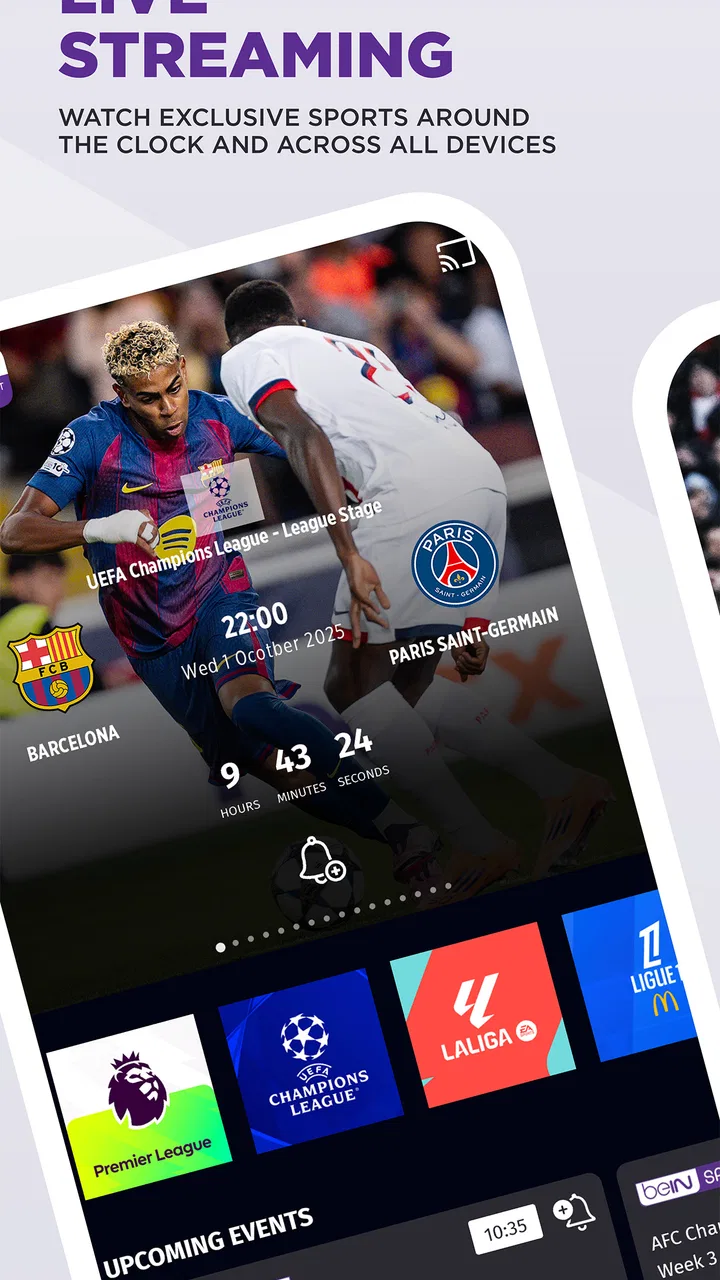
I approached beIN CONNECT (MENA) as a sports viewer who wants a practical way to follow live coverage on a phone, not as a replacement for every television or streaming service. The app comes from beIN MEDIA GROUP and is free to install, with an Everyone age rating. Its central appeal is straightforward: it brings live sports streaming and films into a mobile app, so the useful question is less “does it have a polished home screen?” and more “does it fit the way I actually watch?”
My answer is cautiously positive. The app is most convincing when I want to check a match away from the main television, keep up with sport while travelling around the house, or use a phone as a second screen. It is less compelling for someone who expects every event to be freely available simply because the app itself costs nothing. The distinction between a free download and access to particular viewing content matters here, and I would keep that in mind before treating it like a general free sports service.
How the app earns trust before I start watching
A useful first impression is that this is an established sports application rather than an obscure utility. It has passed the ten-million-install mark on Android and holds an average rating of 4.0 from roughly 157 thousand ratings. Those figures do not guarantee a smooth experience on every device, but they do suggest that the app has been used widely enough for recurring problems and strengths to become visible to a large audience.
You May Also Like

 Blood Strike: 2.5 Anniversary
Blood Strike’s Loadouts Turn Every Drop Into a Tactical Gamble
A close look at Blood Strike’s custom loadouts: how fast access to signature weapons reshapes its battle royale rhythm, rewards preparation, and narrows the gap between fights.

 Pandora - Music & Podcasts
Pandora’s Music Is Easy to Start, but Harder to Recover
Pandora’s strength is its low-effort path from a seed to a station. Its weak spot is how much confidence it asks you to place in connection, setup, and quiet recovery.

 8 Ball Pool
 Is Built on Rivalries, Rematches, and Routine
A close look at the rivalries, rematches, shared routines, and unanswered safety questions that turn a quick pool match into a persistent mobile community.

 Samsung Music
’s Quiet Strength Is Playing What You Already Own
Its reach comes less from spectacle than from dependable access to a personal library. That simplicity is both the app’s strongest retention engine and its ceiling.

 AccuWeather: Weather Radar
AccuWeather Review: A Quick, Clear Forecast for Everyday Decisions
For everyday plans, the best forecast is the one you can understand quickly. AccuWeather makes rain timing, radar, and local conditions easy to act on, with a few trade-offs.

 Hill Climb Racing
Why Hill Climb Racing Still Turns Crashes Into One More Run
A tiny car, a bumpy hill and one more upgrade: Hill Climb Racing keeps resurfacing because its simple chaos makes every near-miss feel personal.
More From Our News Desk
View All News


I also like that the product identity is clear. The developer is named openly as beIN MEDIA GROUP, and the app sits firmly in the sports category instead of pretending to be a neutral video player. That clarity helps me decide what I am installing. I am not expecting it to organize my entire media library or behave like a general-purpose streaming platform; I am opening it for beIN’s mobile sports experience and its related entertainment content.
The release history gives the app a clear starting point: it first appeared on June 23, 2021, and the current version is 10.3. It supports Android 6.0 and later, which is useful for people keeping an older phone in service. At the same time, compatibility is not the same as performance. A phone that can install the app may still offer a less comfortable viewing experience than a newer device, especially during long live sessions or when the connection is not stable.
Because the app is free, I would not judge it by the same standard as a paid standalone sports package. The download price removes the initial barrier, but it does not automatically answer questions about viewing access, account requirements, or the availability of particular broadcasts. I would check the sign-in and viewing prompts before planning an important match around it. That small step prevents the common disappointment of discovering a restriction only when the event has already started.
What I check before trusting a live stream
My first test is deliberately ordinary. I open the app before I need it, look through the sports area, and see how quickly I can understand what is available to watch. I do not want to create an account in a hurry while a match is already underway. I also pay attention to whether the app makes me choose between live content and films clearly, since a sports application becomes frustrating when entertainment tiles hide the event I came to find.
The second test is practical rather than visual. I try the same viewing routine on Wi-Fi and on mobile data, then consider whether the phone has enough battery and storage headroom for a longer session. Live video is sensitive to conditions outside the app, so a frozen picture is not automatically proof that the software is at fault. Still, the app’s value depends on how gracefully it handles a weak connection and how easy it makes it to recover without losing the event.
I would also avoid treating the rating as a promise of identical results. A 4.0 average is respectable, but sports streaming reviews often reflect different phones, networks, account situations, and expectations. One person may be judging the schedule and navigation, while another is judging playback during a crowded public event. I use the rating as context, not as a substitute for testing the exact setup I plan to use.
Controls, permissions, and the moments when data matters
Trust is harder to judge from a sports app’s appearance than from the choices it gives me while I use it. I look for visible account controls, clear sign-in steps, and understandable prompts before I hand over personal information. I do not assume that a familiar brand means every data practice is automatically suitable for me. Instead, I read the permission requests and privacy explanations shown on my device and inside the app, then decide whether each request makes sense for the task.
This is especially important because live viewing encourages rushed decisions. If a major event is about to begin, I may be tempted to accept every prompt just to reach the stream. My better workflow is to pause, read the wording, and distinguish between what is needed for the account or playback and what is optional. If the app presents a choice, I prefer to make it deliberately rather than allowing the excitement of the match to make the decision for me.
On Android, I would review the app’s permissions in the system settings after installation, not only during the first launch. That gives me a second opportunity to see what access is enabled and to remove anything I do not want to keep active. The exact options can vary by Android version and device, so I would rely on the labels shown on my own phone rather than assume that every user sees the same menu.
Account control is just as important as device permissions. If I use the app on a shared phone or a family device, I want to know which account is signed in before starting a session. I would avoid saving credentials on hardware that other people can unlock, and I would sign out when the device is borrowed or returned. These are simple habits, but they matter more than a polished interface when an app is connected to viewing access and personal details.
There is another data-sensitive moment that is easy to overlook: switching between Wi-Fi and mobile data. A live stream can consume a significant amount of a monthly allowance, particularly when I forget that the phone has left the home network. I make a habit of checking the connection indicator before pressing play and watching the phone’s data usage afterward. If the app or operating system offers a data-saving choice, I use it when the event matters less than preserving my allowance; if it does not, I treat mobile viewing as something to monitor rather than leave running unattended.
A realistic evening with beIN CONNECT
Imagine that I am preparing dinner while a match is in progress. The television is occupied, so I install the app on a compatible Android phone, sign in if the viewing flow asks me to, and use Wi-Fi rather than mobile data. I keep the phone on a stand where I can glance at it without carrying it around the kitchen. In that situation, the app solves a real problem: I can follow the action without needing another television or interrupting someone else’s program.
My preparation would not stop at opening the stream. I would check the event before cooking, confirm that the phone is charging or has enough battery, and make sure the screen will not lock at an inconvenient moment. I would also keep the app’s account details private if other people use the device. This routine sounds excessive for a casual viewer, but it is exactly the kind of preparation that separates a dependable second-screen experience from a frustrating one.
The same workflow works for a commuter who has Wi-Fi access before leaving home and wants to continue watching elsewhere, although the connection change becomes the main risk. I would not begin a long live session on mobile data without checking my allowance. For a short update or a few minutes of coverage, that may be acceptable; for an entire event, a stable Wi-Fi connection is the more sensible choice.
Where the app fits beside usual alternatives
Compared with a traditional television subscription or set-top box, the mobile app is more flexible but less naturally comfortable for extended viewing. A phone is excellent for portability and personal watching. It is not automatically the best choice for a group gathered around a large screen. If everyone in the room wants to watch together, a television-based option may be easier on the eyes and simpler to control.
Compared with a general video platform, beIN CONNECT has a narrower purpose. That focus can be an advantage when I want sports-related viewing rather than an endless mixture of unrelated clips. It can also be a limitation if my household wants a broad entertainment catalog in one place. The inclusion of films gives the app some extra range, but I would still choose it primarily for the sports experience rather than expect it to replace a general streaming subscription.
Compared with free sports news apps, this app is aimed at watching rather than merely checking scores or reading updates. That makes it more useful when live pictures are the priority, but it also means that playback, connection quality, and viewing eligibility matter much more. If I only need a score notification while working, a lighter service may be more convenient and less demanding on battery and data.
Small habits that make the experience better
My first practical tip is to set up the app before the event, not at kickoff. This gives me time to handle account prompts, update the application if necessary, test the network, and discover whether the content I want is available to me. It also lets me decide whether the phone’s screen, speakers, and battery are good enough for the occasion.
Second, I treat the phone as a viewing device with limits. I keep it plugged in for a long session, use headphones when other people are nearby, and avoid placing it somewhere that can overheat. If the picture starts buffering, I check the network and other active downloads before repeatedly restarting the app. That troubleshooting order is useful because it separates a local connection problem from an application problem.
Third, I review my account and permission choices after the first week rather than forgetting them. I check whether I am still signed into the correct account, whether the app has more system access than I intended, and whether notifications are helping me or simply interrupting my day. This is a better expression of user control than accepting the initial setup and never looking again.
One trade-off deserves special attention: convenience can encourage passive data sharing and passive data consumption. The fastest path is not always the most private or economical path. I prefer to use the app with only the access I understand, on a connection I have chosen, and with notifications limited to what I genuinely want. That approach does not eliminate every risk, but it keeps the important decisions in my hands.
Who should use it, and who should skip it?
I would recommend beIN CONNECT to sports fans who already value beIN’s coverage, want a mobile viewing option, and are comfortable checking access details before an important event. It is also a sensible choice for households where the main television is often unavailable, or for viewers who want a personal screen while moving between rooms. The free installation makes it easy to explore without paying upfront for the app itself.
I would be more cautious if my priority is completely free, unrestricted sports viewing. The app’s download price alone does not establish that every live event is available without conditions, so I would verify the path to the specific content I care about. I would also look elsewhere if I mainly want scores, alerts, or news, because a full streaming app may be more than I need.
People who dislike creating accounts, managing permissions, or monitoring mobile data may find the experience less convenient than a television channel already included in their existing setup. Likewise, viewers with an older phone should test playback before relying on it for a long event, even though Android 6.0 is the stated minimum operating system. Compatibility opens the door; it does not promise that every device will feel equally quick or comfortable.
My cautious verdict
beIN CONNECT is a credible mobile sports companion, and I can see a clear place for it in everyday viewing. Its strongest quality is not that it tries to be everything; it is that it gives beIN MEDIA GROUP’s audience a way to watch sports and films from a phone. The broad adoption and solid four-point average support the impression that it is a serious, established app rather than a disposable download.
My recommendation comes with a condition: I would install it for a specific viewing need, then inspect the account flow, permission prompts, and content access before depending on it. I would use Wi-Fi for long sessions, protect account details on shared devices, and keep an eye on battery and data use. Those steps are not complaints about the app; they are sensible safeguards for any live video service.
The best reason to choose it is controlled convenience: live sports in a personal, portable format, provided the viewing access and connection suit your situation. If that describes your routine, the app is worth trying. If you only need quick sports information or want a broad, effortless television replacement, a different option may fit better. I would keep beIN CONNECT on my phone for the moments when mobility matters, while remaining careful about what I authorize, what I watch, and how much the session costs in attention, battery, and data.
FAQs for beIN CONNECT (MENA)
01What is beIN CONNECT (MENA) and what does it offer?
beIN CONNECT (MENA) is a streaming service that provides access to a wide range of sports, entertainment, and live TV channels. It offers exclusive sports coverage, including football, tennis, and motorsports, along with movies, series, and kids' content. Subscribers can enjoy high-quality streaming on various devices, making it a versatile choice for entertainment and sports enthusiasts.
02Is beIN CONNECT available on all devices?
Yes, beIN CONNECT is compatible with a variety of devices, including smartphones, tablets, smart TVs, and computers. It supports both Android and iOS platforms, ensuring users can stream content seamlessly across different devices. Check the app store or the official beIN website for specific device compatibility requirements to ensure optimal performance.
03How does the subscription model work for beIN CONNECT?
beIN CONNECT offers a flexible subscription model with several packages tailored to different viewing preferences. Users can choose from sports-only packages, entertainment bundles, or comprehensive subscriptions that include both. Each package is priced differently, and users can opt for monthly or yearly plans, depending on their needs. Ensure to review the terms and conditions before subscribing.
04Does beIN CONNECT offer live sports streaming?
Yes, beIN CONNECT provides extensive live sports streaming, covering major leagues and tournaments worldwide. Subscribers can watch live football matches, tennis tournaments, and more, with expert commentary and analysis. The service also offers highlights and replays, allowing users to catch up on any missed action. Ensure a stable internet connection for the best live streaming experience.
05Are there parental controls available on beIN CONNECT?
beIN CONNECT includes parental control features to ensure a safe viewing experience for children. Parents can set restrictions on specific content types and create profiles with age-appropriate settings. This feature is particularly useful for families who want to monitor and control the content accessible to younger viewers. Check the app settings for guidance on setting up these controls.
Pros
- Extensive sports coverage available.
- High-quality video streaming offered.
- User-friendly interface design.
- Supports multiple device connections.
- Live match notifications included.
Cons
- Limited content outside sports events.
- Requires stable internet connection.
- Occasional streaming delays noted.
- Subscription required for full access.
- Not available in all regions.

beIN CONNECT (MENA)
Gallery